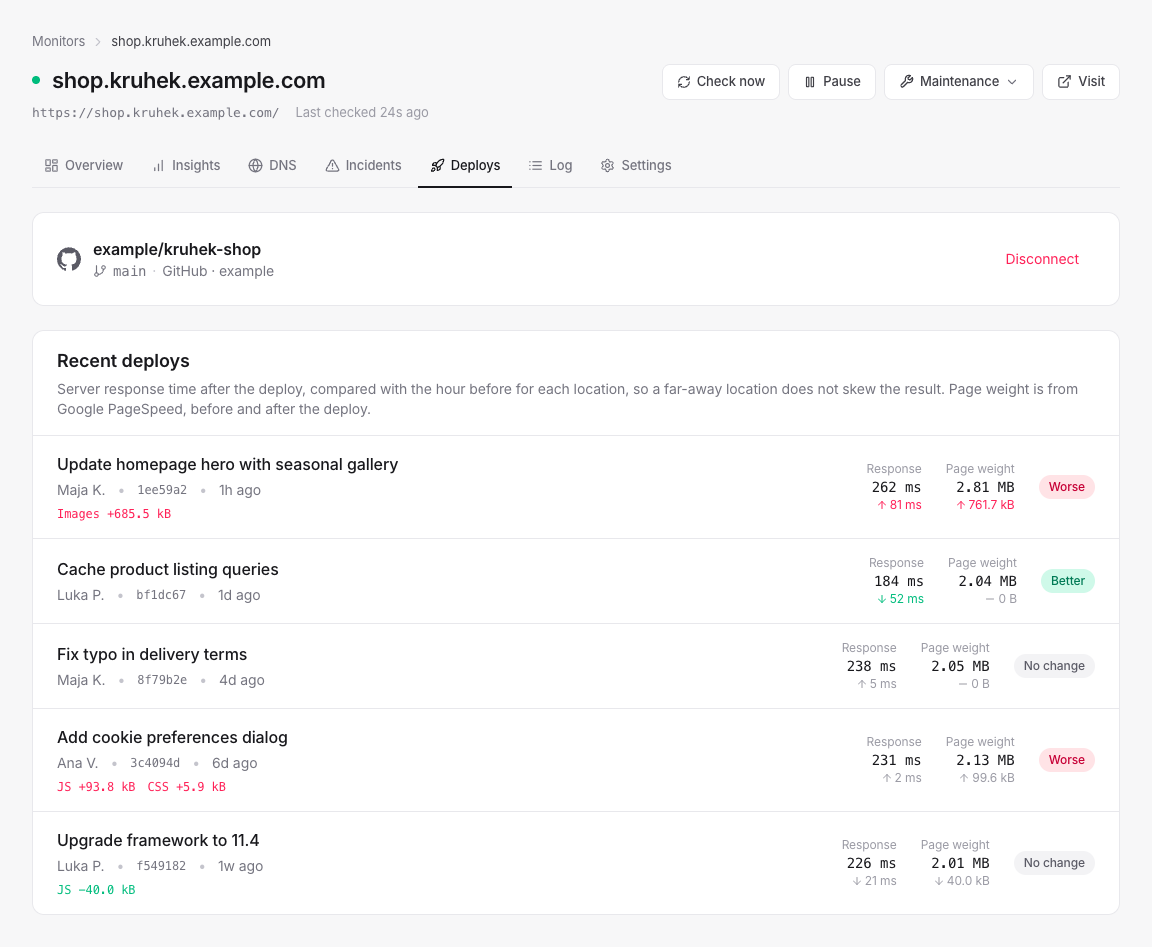
Connect a repository from GitHub, GitLab or Bitbucket. Every push to the production branch is a deploy: we measure it from all of the monitor's locations right after, compare it with the hour before, and tell you if it got noticeably slower.
GitHub through our app, GitLab (gitlab.com or self-hosted) and Bitbucket with a token. A successful GitHub deployment status moves the measurement forward.
Each region only against itself, so a different mix of locations is never reported as a change. Server response time in three rounds after the deploy, and page weight by type from Google PageSpeed.
A noticeably slower or heavier deploy sends one warning to the channels of your first alert: never an SMS, and held during quiet hours like any warning.
A deploy that got slower is a lead, not a verdict: the comparison shows what changed after the commit, not that the commit caused it. There is no generic deploy webhook yet. Deploys come from a connected repository.
Uptime monitoring
HTTP, TCP ports and ping, from six regions
Performance monitoring
Response time per location and page load from PageSpeed
SSL & domain expiry
Certificates and registrations, weeks ahead
DNS history
What changed in your DNS, and when
Alerts
Email, Slack, Discord, Telegram and webhooks, without spam
Status pages
One public page for all of a client's services
Maintenance windows
Planned work that does not page anyone
No card, no trial countdown. Add a monitor and it starts being measured before you finish reading this sentence.